Introduction
In an Attack & Defense style CTF, each team starts out with an identical set of vulnerable services. Teams need to find vulnerabilities in these services, patch their own instances of them, and exploit the vulnerabilities they find in other teams' instances to steal flags.
The scoring engine will be checking the services to ensure they are functioning properly and that the flags are being placed and retrieved correctly. As such, your patches should not modify the application functionality or expected responses.
You will have root access to the machine that's hosting your services, so you will be able to see the source code and modify it to patch the vulnerabilities. The services will generally be hosted using Docker containers.
Check out this explanatory video about Defcon Attack/Defense CTF 2018 . The specifics may be different, but this is a great overview of the Attack/Defense competition format.
Scoring
The game is split into basic units of time called "ticks" that will last approximately 120 seconds each. On every tick, competitors may lose or gain points based on 3 different scoring categories. The points for the offense, defense, and uptime categories get added up to calculate the total (), where half of that sum always counts and the other half is multiplied by your uptime percentage. The team with the highest total score at the end of the competition wins.
Offense ()
The scoring engine will place a new flag in each of the team's services on every tick. Teams will gain offense points by stealing those flags from other teams. The team will gain a number of points equivalent to N/<number of times that flag was stolen>. N is 1.5 for flags from "active" teams and 0.1 for flags from "inactive" teams. A team is "active" if it has captured at least 1 flag from another team. For example, if a flag placed on an active team's service during tick 10 gets captured by 5 teams, each of those 5 teams will gain 1.5/5=0.30 points for that flag.
The teams will also receive a one-time bonus for capturing their first flag based on submission time (the sooner you submit your first flag, the higher the bonus will be): 50 * exp(-0.025 * SUBMISSION_TIME_IN_SECONDS/180), where SUBMISSION_TIME_IN_SECONDS is the number of seconds elapsed since the competition start.
Defense ()
Teams will lose defense points when their flags get stolen: -0.5 points per stolen flag, up to a maximum of -5 points per tick per service.
Uptime / SLA ()
Teams keep their uptime percentage by keeping their services up and running properly. Every tick, the scoring engine will attempt to interact with the service (for example by adding a new flag, checking for existence of a previously added flag, interacting with the service as a general user, etc). If the service is up and functional, the teams will gain (or maintain) their uptime percentage. If the service is down or the functionality is not working as expected, the team will lose uptime percentage for that tick. Because the scoring engine is looking for specific expected responses to validate functionality, you should not modify the application UI or the application flow. Backup zips of the original source code can be found on the systems.
Every tick each of your services is up, you will get up to 1.5 points per service. The uptime score is 4 checks worth 0.5 each (2 points), scaled to a maximum of 1.5 points: (1) the service is up, (2) a new flag was planted, (3) the most recent previous flag was retrieved, and (4) a random previous flag was retrieved. This is your uptime score.
In addition, half of each team's service's total score always counts, and the other half is multiplied by their uptime percentage for that service. For example, if a team scores 1000 points in the Attack/Defense for Service A with an uptime percentage of 75%, the team will end up with 500 + 500 × 0.75 = 875 points on the Attack/Defense scoreboard for Service A.
TL;DR:
- Offense: N/<number of times that flag was stolen>.
Nis1.5for flags from "active" teams and0.1for flags from "inactive" teams. A team is "active" if it has captured at least 1 flag from another team. - Defense: -0.5 points per stolen flag, up to a maximum of -5 points per tick per service.
- Uptime: Up to 1.5 points per service per tick if your service is up and all checks pass.
- First flag bonus: 50 * exp(-0.025 * SUBMISSION_TIME_IN_SECONDS/180) points, where SUBMISSION_TIME_IN_SECONDS is the number of seconds elapsed since the competition start. The sooner you submit your first flag, the higher the bonus.
- Total score per service: The sum of the offense, defense, and uptime scores, with half always counting and the other half multiplied by your uptime percentage for that service.
Flag Submissions
The scoring engine continuously puts new flags in each team's services (1 flag per service per tick) by using the functionality of that service. The flags are meant to be private, and the location of where they are stored is different for every service. Each flag is also associated with a unique "flag identifier" / "flag id", which corresponds to a different value for different services. Since each service contains many flags, these flag identifiers are made public to the attacking teams, so that they have the needed information to locate a particular flag on a team's service. Without it, you'd have to enumerate all the data on the service to find anything.
For example, say a service stores flags in user profiles and the flag identifier is the username mary. If you found a vulnerability that lets you read any user's profile, you'd use the flag identifier to target mary's profile specifically to steal just that flag.
When writing your exploits, you'll want to parameterize the flag identifier and the target team's host/port so you can run the same attack against every team, every tick.
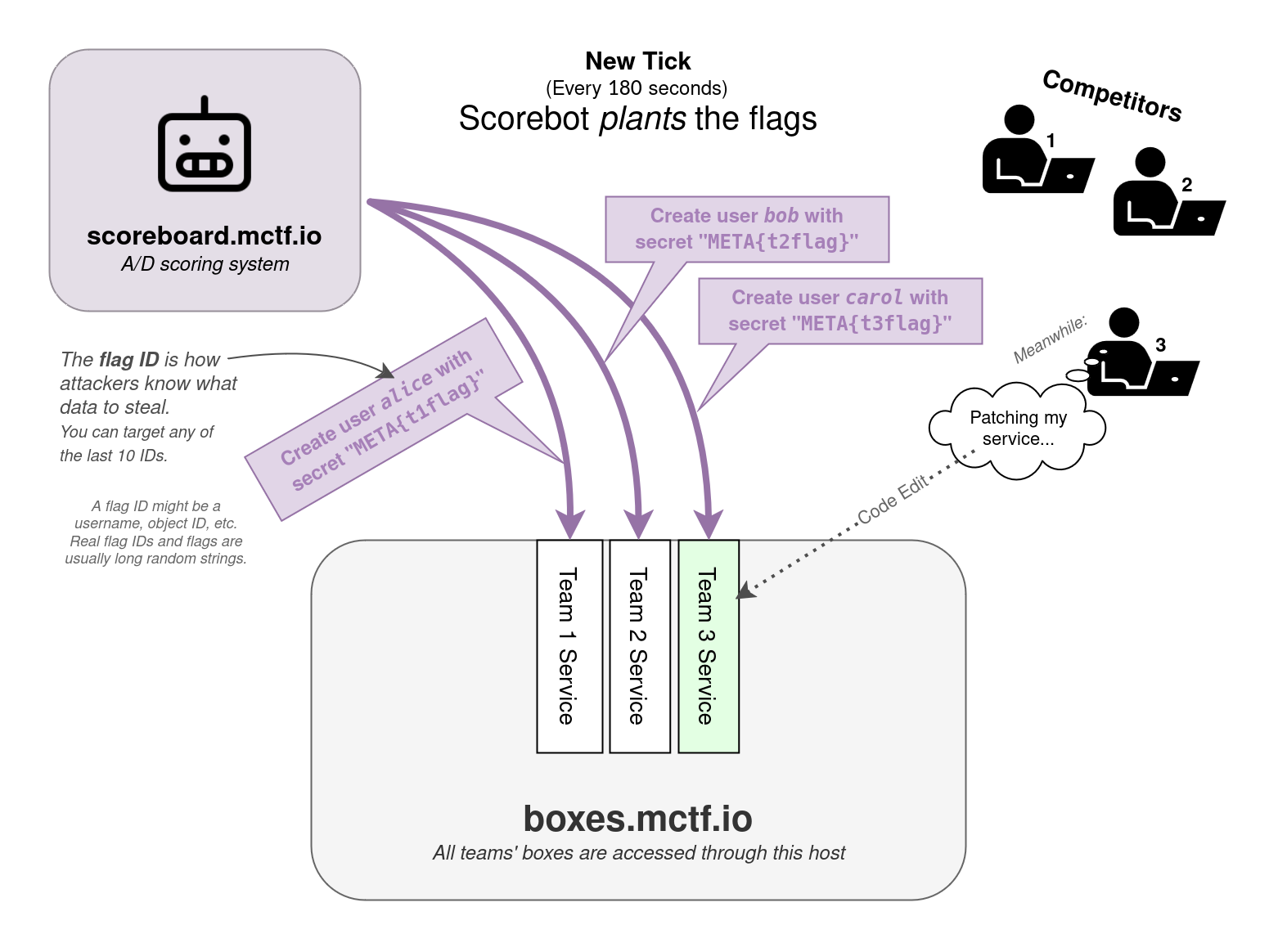
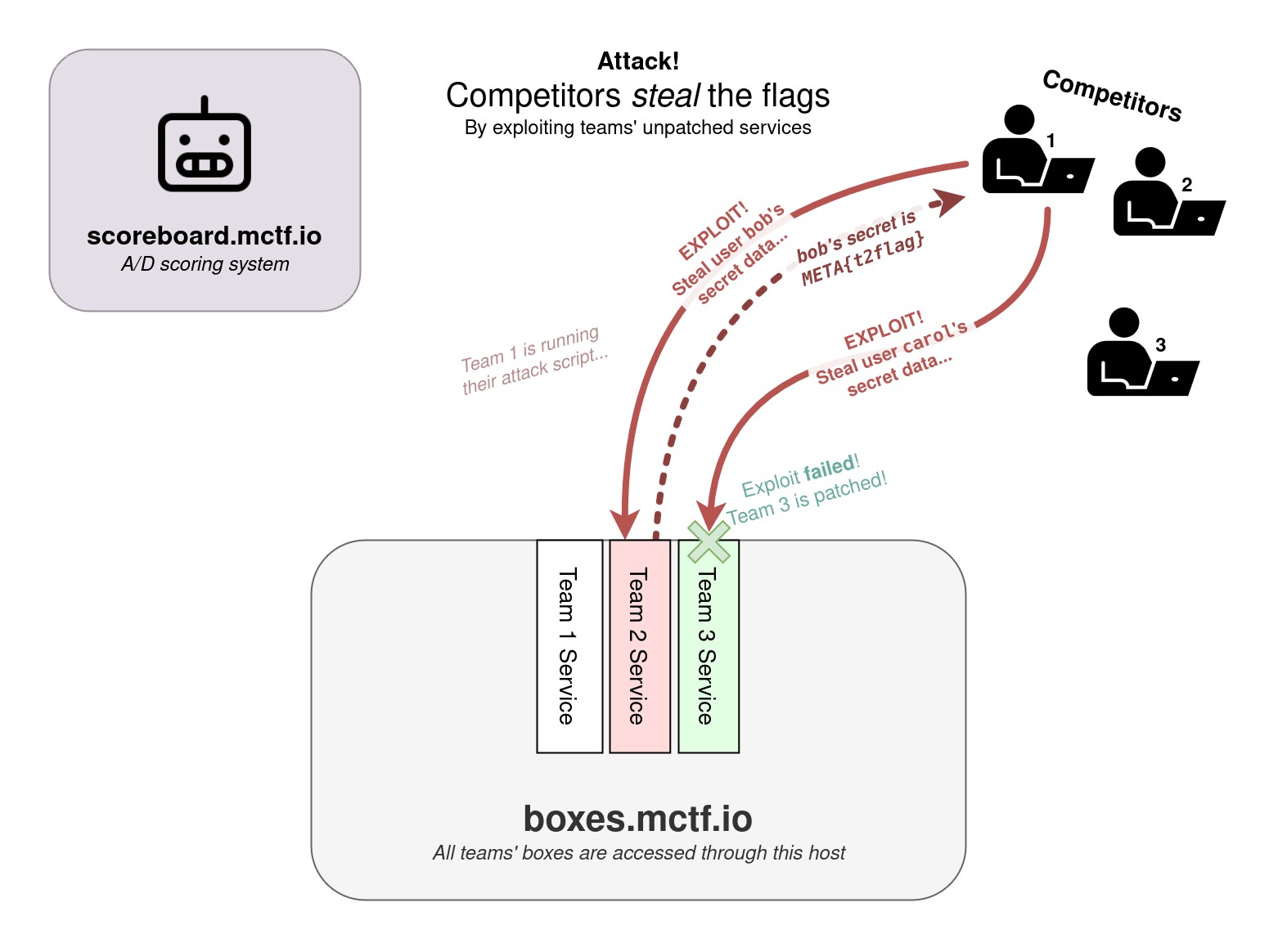
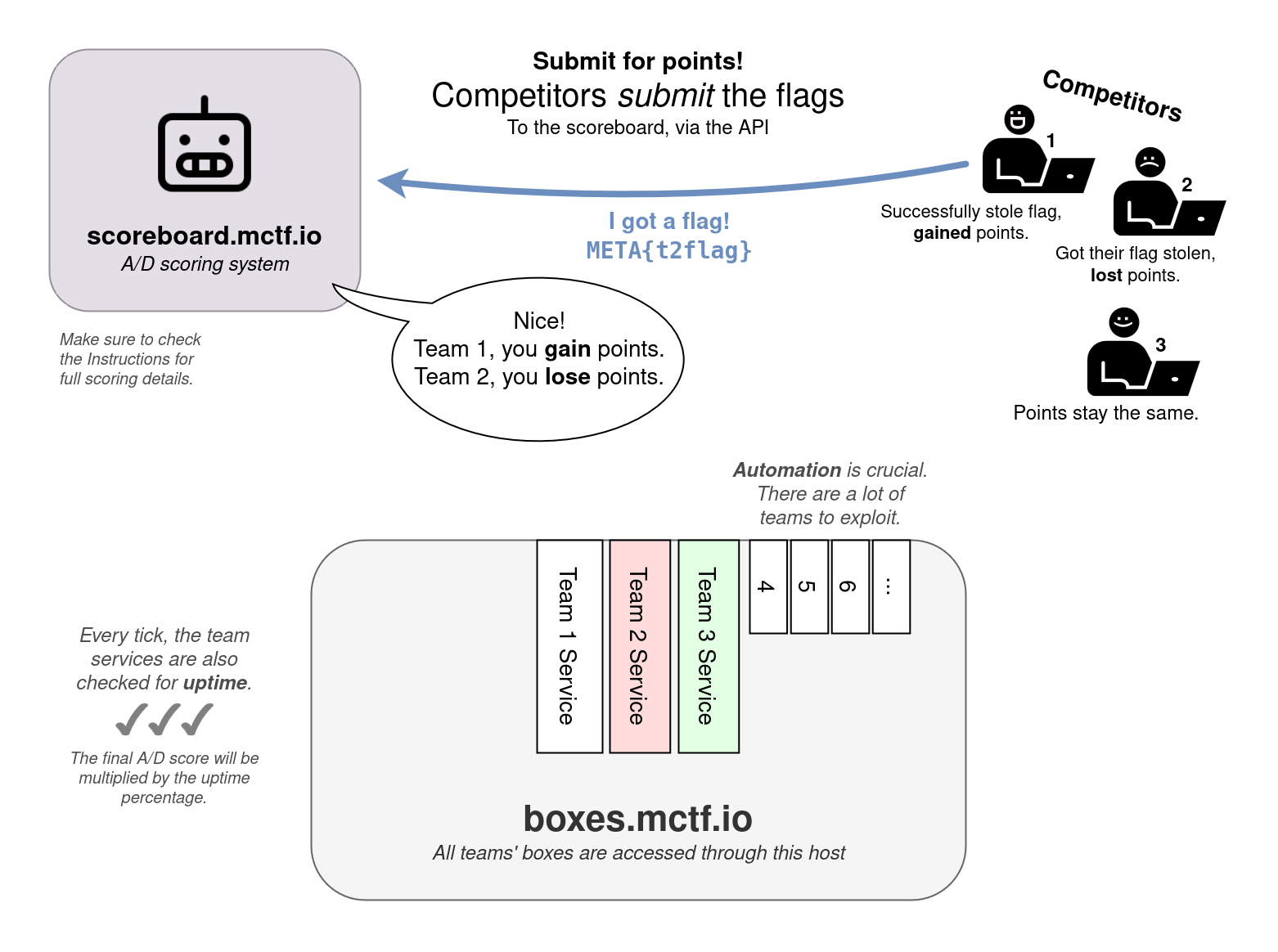
Each flag has a certain time to live, after which it will no longer be accepted and can no longer be captured. For this competition, the flag lifetime is equivalent to 5 ticks, which equals roughly 10 minutes. Each flag will have its expiration time published.
A list of available flags can be accessed and captured flags can be submitted using the API. You can access the documentation here, but the following are the main endpoints you should be aware of:
API Documentation and Response Format
All endpoints may become rate limited. If that happens, the "/submit" endpoint will have higher limits than the other endpoints.
You must send your private team-token in the header.
https://api.ad.mctf.io/endpoints (GET)
Send a request to this endpoint to get a JSON list of all of the available team machines. This list will get updated as more teams join.
https://api.ad.mctf.io/live_flags (GET)
Access this endpoint to see the list of flag identifiers for all available and unexpired flags for all teams except yours.
https://api.ad.mctf.io/submit (POST)
Send your flag (as flag_in in the body) to the scoring engine to be graded. You must send your private team-token in the header.
Here are some code examples you could use to interact with the API.
For other languages, please use a tool like https://curlconverter.com/
GET request
import requests
import json

url = "https://api.ad.mctf.io/live_flags"
headers = {"team-token": "abcd"}

response = requests.get(url, headers=headers)
result = json.loads(response.text)

print(result)
POST request
import requests

url = "https://api.ad.mctf.io/submit"

payload = { "flag_in": "META{XYZ123}" }
headers = { "team-token": "abcd" }

response = requests.post(url, data=payload, headers=headers)

print(response.text)
GET request
curl -X 'GET' 'https://api.ad.mctf.io/live_flags' -H 'team-token: abcd'
POST request
curl -X 'POST' 'https://api.ad.mctf.io/submit' -H 'accept: application/json' -H 'team-token: abcd' -H 'Content-Type: application/x-www-form-urlencoded' -d 'flag_in=META{XYZ}'
GET request
const options = {method: 'GET', headers: {'team-token': 'abcd'}};

fetch('https://api.ad.mctf.io/live_flags', options)
  .then(response => response.json())
  .then(response => console.log(response))
  .catch(err => console.error(err));
POST request
const options = {
  method: 'POST',
  headers: {
    'team-token': 'abcd',
    'Content-Type': 'application/x-www-form-urlencoded'
  },
  body: new URLSearchParams({flag_in: 'META{XYZ123}'})
};

fetch('https://api.ad.mctf.io/submit', options)
  .then(response => response.json())
  .then(response => console.log(response))
  .catch(err => console.error(err));
Packet Captures
Using the provided credentials and instructions below, you can access a folder with PCAPs that continuously captures the network traffic going to and from your services. Use it to analyze the attacks against your services, so you can patch the exploited vulnerabilities and use the same exploits against the other teams.
Each file contains up to 10 minutes or 8MB of traffic, whichever one gets reached first. The packets get saved to the file continuously (although there's a 4096 byte buffer), so you don't have to wait for tcpdump to finish writing to the file before looking at it. Wireshark might give you a warning if you try to open one of these files, but you can typically ignore it. If you want to modify the packet capture system, see /etc/systemd/system/dumper-health.service and dumper-password.service.
Please note that "Team 1" is a "NOP" team (a test team / not a real team). You can try out attacks against this team without worrying about leaking them in the .pcap files.
Network Design and Environment Access
Each team will be assigned a team number (1 through number of teams, #1 is NOP).
Each team will be given a private virtual machine that will be used to host all of their services in Docker containers. You will receive your team number and credentials to access your team VM from within the MetaCTF platform once the competition starts. The VMs will have outbound internet access but will not be reachable from the internet.
Team VMs cannot communicate with each other, and neither the scoring engine nor the players can reach the VMs of other teams directly. Instead, all connections to the services of other teams will go through a central reverse TCP proxy for each service.
All teams will be provided with 8 WireGuard configuration files to connect to the competition network. The teams will be able to directly access all ports on their private Virtual Machines through the WireGuard tunnel. To access the services of other teams, they will have to go through the reverse proxies, which will also only be accessible through the WireGuard tunnel.
Network Summary
10.0.1.team_id- your team's private virtual machine. This machine can only be reached from your team's WireGuard server or the service proxies.10.0.2.service_id:5000+team_id- the service proxies. Each service will be routed through a different VM and each team can be reached through a different port.10.0.3.team_id- the WireGuard server for your team. This server will be reachable from the internet via a public IP address.
Services on each team's VM:
- The scored services. In scope.
Reachable via HTTP/TCP to10.0.2.service_idon port 5000 + team_id.
Note that some services may have multiple ports; in these cases there will be multiple service_ids corresponding to one service. - SSH, for box administration. Each team will receive unique SSH credentials through the MetaCTF platform. Out of scope, not reachable by other teams.
SSH to10.0.1.team_idon port 22. - Tulip, an Attack/Defense traffic visualization tool. Use your credentials to access this. Out of scope, not reachable by other teams.
HTTP to10.0.1.team_idon port 7000. - TCPDump pcap listings, for forensics. Use your credentials to access this. Out of scope, not reachable by other teams.
HTTP to10.0.1.team_idon port 8000. - VSCode, to view the code stored on the machine, search for exploits, or work on patches. (You will need to use ssh to actually push the patch in most cases). Use your credentials to access this. Out of scope, not reachable by other teams.
HTTP to10.0.1.team_idon port 9000.
For example, if your team number was Team 1, then the first scored service for your team would be hosted on port 5000 + 1 = 5001, and you would run curl 10.0.2.1:5001 to reach it.
If you wanted to attack Team 67's service #2, 5000 + 67 = 5067, you would send your traffic to 10.0.2.2:5067.
AI Policy
- The competition AI policy is in effect. The A/D will open at the same time as limited AI usage becoming allowed, but make sure you abide by the limits - only use our provided OpenRouter keys to access remote AI systems, abide by the local LLM rules if you run one on-prem, etc.
Screen Recordings
- As part of the event, competitors are required to stream their screens to admins using either our provided ffmpeg-based utility, or OBS Studio. You may not modify, stop, or interfere with this process in any way.
- Remember that your screen may be viewed by others. Please be mindful of what you do on your machine while competing.
Other Rules
-
Denial of Service (DoS) attacks are not allowed. This includes:
- Flooding the network or services with traffic.
- Deleting flags from other teams' services.
- Taking down or causing other teams' services to crash or become unresponsive.
- You may only use tools and services that are free to use or have been developed by you or your team.
- Do not attack the scoring engine or the competition infrastructure.
- No physical or Wi-Fi attacks.
- No flag sharing or collaboration with other teams.